 위린이
위린이
Set favicons with JavaScript
Managing favicons across multiple HTML files is tedious. JavaScript handles it in one place.
Need to generate favicon images first? Use Favicon Generator.
HTML favicon
<link rel="icon" href="../images/favicon.png" />
rel="shortcut icon"is non-standard (IE legacy). Modern browsers ignoreshortcut. Userel="icon".
JavaScript
function setFavicons(favImg) {
  let head = document.querySelector("head");
  let favicon = document.createElement("link");
  favicon.setAttribute("rel", "icon");
  favicon.setAttribute("href", favImg);
  head.appendChild(favicon);
}

setFavicons("https://spemer.com/img/favicon/favicon.png");
One function, all pages covered.
Array for multiple icon types
function setFavicons(favImg) {
  let head = document.querySelector("head");

  let favIcons = [
    { rel: "icon" },
    { rel: "apple-touch-icon" },
  ];

  favIcons.forEach(function (favIcon) {
    let link = document.createElement("link");
    link.setAttribute("rel", favIcon.rel);
    link.setAttribute("href", favImg);
    head.appendChild(link);
  });
}

setFavicons("https://spemer.com/img/favicon/favicon.png");
Apple touch icon
Previously you needed 152x152, 167x167, and 180x180. Now 180x180 alone is enough - iOS downscales automatically.
function setAppleFavicon() {
  let head = document.querySelector("head");
  let link = document.createElement("link");
  link.setAttribute("rel", "apple-touch-icon");
  link.setAttribute("sizes", "180x180");
  link.setAttribute("href", "../apple-touch-icon.png");
  head.appendChild(link);
}

setAppleFavicon();
SVG favicons
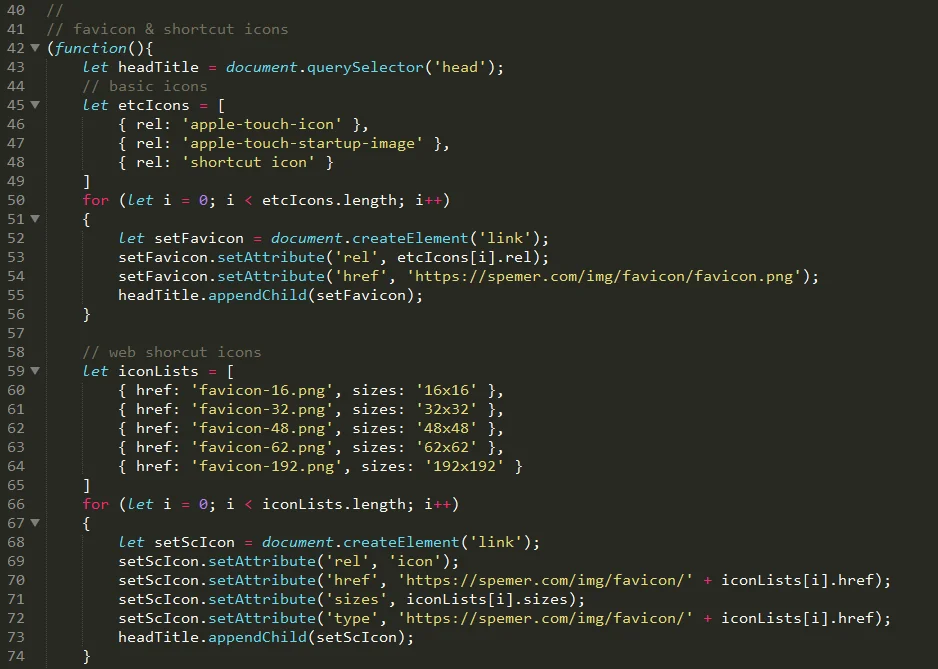
SVG favicons are sharp at any size and support dark mode via prefers-color-scheme. The modern minimal set: SVG + PNG fallback + Apple touch icon.
function setFavicons() {
  let head = document.querySelector("head");

  // SVG favicon for modern browsers
  let svgIcon = document.createElement("link");
  svgIcon.setAttribute("rel", "icon");
  svgIcon.setAttribute("type", "image/svg+xml");
  svgIcon.setAttribute("href", "../favicon.svg");
  head.appendChild(svgIcon);

  // PNG fallback
  let pngIcon = document.createElement("link");
  pngIcon.setAttribute("rel", "icon");
  pngIcon.setAttribute("type", "image/png");
  pngIcon.setAttribute("sizes", "32x32");
  pngIcon.setAttribute("href", "../favicon-32x32.png");
  head.appendChild(pngIcon);

  // Apple touch icon
  let appleIcon = document.createElement("link");
  appleIcon.setAttribute("rel", "apple-touch-icon");
  appleIcon.setAttribute("sizes", "180x180");
  appleIcon.setAttribute("href", "../apple-touch-icon.png");
  head.appendChild(appleIcon);
}

setFavicons();
Android / PWA
Same approach works for Android icon sizes:
<link rel="icon" href="../favicon-48.png" sizes="48x48" type="image/png" />
<link rel="icon" href="../favicon-192.png" sizes="192x192" type="image/png" />
Change one line in JavaScript, every page updates. Dynamic parameters also enable badge icons or dark mode swaps.
Favicon images not ready? Favicon Generator outputs all sizes at once.